> For the complete documentation index, see [llms.txt](https://docs.reefcloud.ai/llms.txt). Markdown versions of documentation pages are available by appending `.md` to page URLs; this page is available as [Markdown](https://docs.reefcloud.ai/get-results/export-your-results.md).
# Export your data
Guide to downloading your ReefCloud data for analysis and reporting.
ReefCloud enables you to export your project data in .CSV format for detailed analysis and reporting. This page guides you through the available export options, data structure, and best practices for working with your exported data.
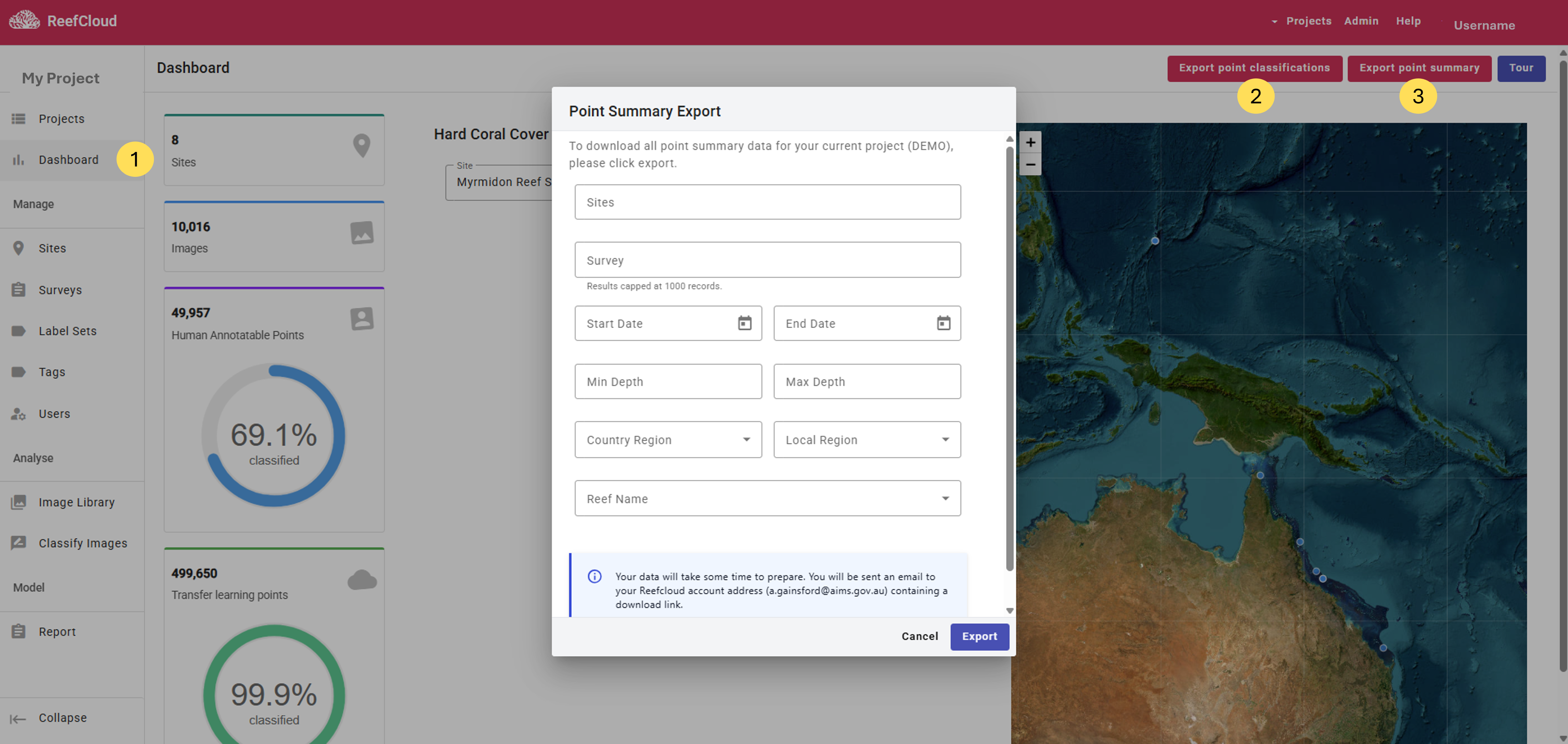
1. Your project data can be exported in two formats, "Point Classifications" "Point Summary", using the pink buttons on the top right of the **Dashboard** page.
{% hint style="warning" %}
**Before exporting your data,** make sure you are happy with your [AI model performance](/train-and-validate-ai/validated-ai-results.md) and have explored the Model Report for your project, taking note of guidance to spread annotation effort across your sites and surveys.
{% endhint %}
{% hint style="info" %}
## Filter Options for Exporting Data
Consider refining your dataset when exporting by applying filters, such as selecting one or more sites, limiting results to particular survey dates, or narrowing the export to a specific depth range, country, or region. This allows you to tailor the export to your analytical or reporting needs by including only the data most relevant at the time. Alternatively, you can choose to ignore these filters entirely and export all available data from your project in one comprehensive file.
{% endhint %}
2\. The **Point Classifications** export presents project data point by point, with every single annotation point in the dataset represented by a row of data. Columns represent the array of information within your dataset, including labels assigned by the machine (“point\_machine\_classification” e.g. “TA”) and human if a given point has been annotated.
{% file src="/files/W2PnYOyUEVHCSNMkilvV" %}
3. The **Point Summary** export includes only the benthic data summarised within each image, where for every enabled image in the project, the percentage cover of all benthic labels (calculated from the total 50 machine annotated Transfer Learning Points per image) is provided in wide format. Each row represents one image, and columns contain image metadata alongside summaries.
{% file src="/files/l1b2GDBtn2rFVRdNQSBE" %}
Example reefcloud-point-summary.csv file to preview the structure and types of data to be expected in the export.
{% endfile %}
{% hint style="success" %}
## Your data is on the way!
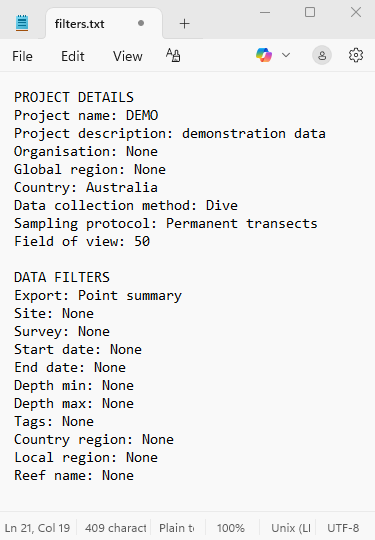
* Once you click "Export", a download link to a .CSV file containing your data and a filters.txt file (see below) containing your Project Details and Data Filter choices will be sent to the email address associated with your ReefCloud account. This email address will also be listed in the export window!
* If you have applied any filters, the downloadable file will include only the filtered dataset. If no filters were applied, the export will include all data in the format chosen.
* Depending on how large your project is and the options you have chosen, this file might take some time to prepare.
{% endhint %}
Project Details and Data Filters applied are included in the filters.txt file sent via the download link during export. The example provided relates to a Point Summary export.
{% embed url="" %}
Four minute video demonstrating how to download your data as a .csv file and what it will look like.
{% endembed %}
{% hint style="info" %}
Note that some features and pages of ReefCloud have recently been updated and may not match the 'How to' video above exactly. We didn't want to hold up releasing these updates and are working on improving these video resources to reflect the updates you are using. Thank you for your understanding while this takes place!
{% endhint %}